

Tips & Tricks to Start Selling on the Pure Marketplace

Ways to sell on the Orderbook-Style Marketplace
The Pure marketplace is the first order book-style marketplace for the rare coins and precious metals community. It's built for dealers, collectors, wholesalers, and everyone in between to buy and sell their items. The marketplace works like a stock exchange, with bids and asks broadcast throughout the day across a range of generic products we call "tickers." These tickers trade regularly, and physical metal moves to fulfill the orders behind them.
For a deeper walkthrough of how bids, asks, and the order book itself work, see How to Read an Order Book.
Premium-Based Market
Each ticker has its own competitive market, where outside forces move the underlying spot price (the price of the commodity on the COMEX exchange). That's why Pure runs as a premium-based marketplace: bids and asks are denoted as a percentage over spot, a dollar amount per ounce over spot, or a fixed price. Premiums let you hedge the underlying metal and give buyers a transparent way to see how much metal content they're paying for.
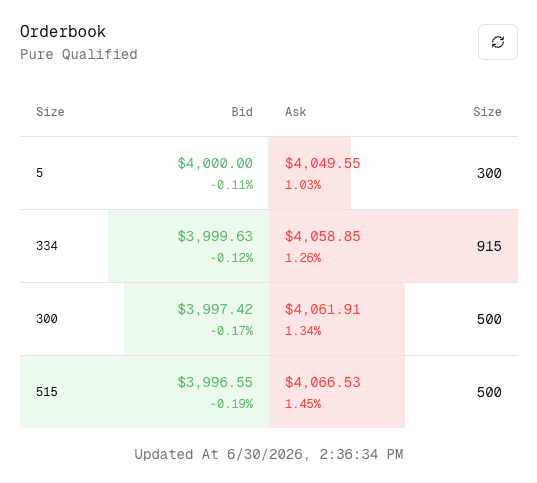
Take the 1 oz American Gold Eagle, the most commonly traded coin in the US and arguably the world. Many people are buying and selling this ticker at once. Bids are the green numbers on the left side of the order book: how much you could sell one unit for, before fees. Asks sit on the right: how much you could buy one unit for, before fees. Size is how much quantity is available at that price. Under each bid or ask, we show the corresponding premium so every entry is transparent, and entries are ranked by value.
Selling an "Overfilled" Quantity
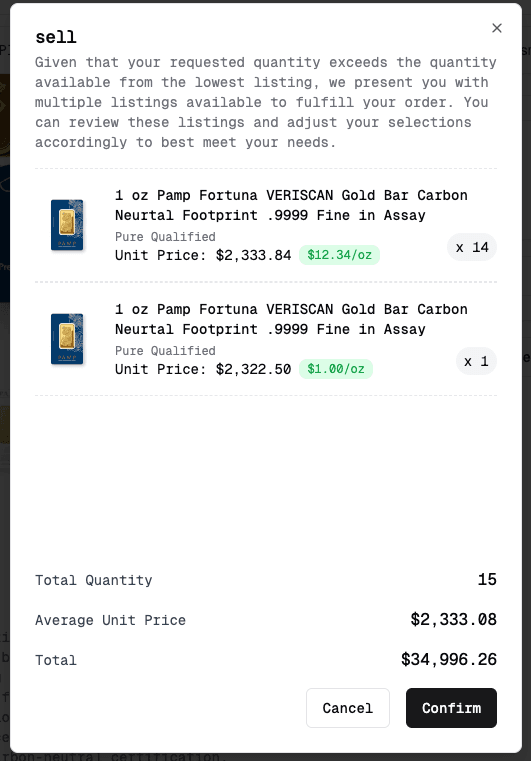
Once you understand how the order book works, the next useful feature is what it allows for larger sells. Say you have 15 PAMP Fortuna 1 oz gold bars, but the top bid in the order book only covers 14 units. The system automatically pulls the next available bid to complete the order. That lets larger orders get placed and filled, depending on how much bid depth is in the market. (Those PAMP Fortuna bars are the same ones Costco sells; if that is where yours came from, here is what to know about selling Costco gold bars.)
Placing an Ask
If you've looked over the order book and the current bid isn't high enough for you, you can place an ask instead, which appears as the lowest ask if the price is competitive. If your ask comes in below the current highest bid, you'll see an error.
On each product page, below the pricing, there's a feature to place an ask. Once you're signed in, you can enter the market for your item using three pricing types:
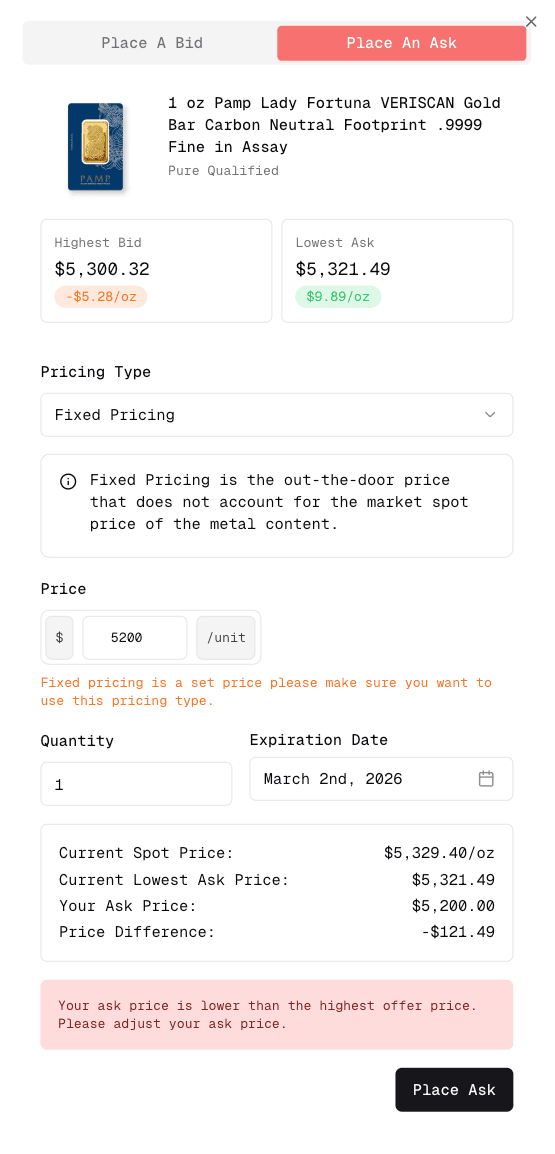
Premium Dollar Pricing: a fixed dollar amount added to the spot price per troy ounce of metal content.
Premium Percent Pricing: a positive markup added to the market spot price of the metal content.
Fixed Pricing: an out-the-door price that doesn't account for market spot price at all.
These let you hedge the spot price of your metal to land on the premium you want. Fixed pricing has no hedge attached since it's a flat, set price.
Premium Dollar Pricing and Premium Percent Pricing are off by default. To turn them on, go to your dashboard settings and enable advanced mode.
Deactivating Listings
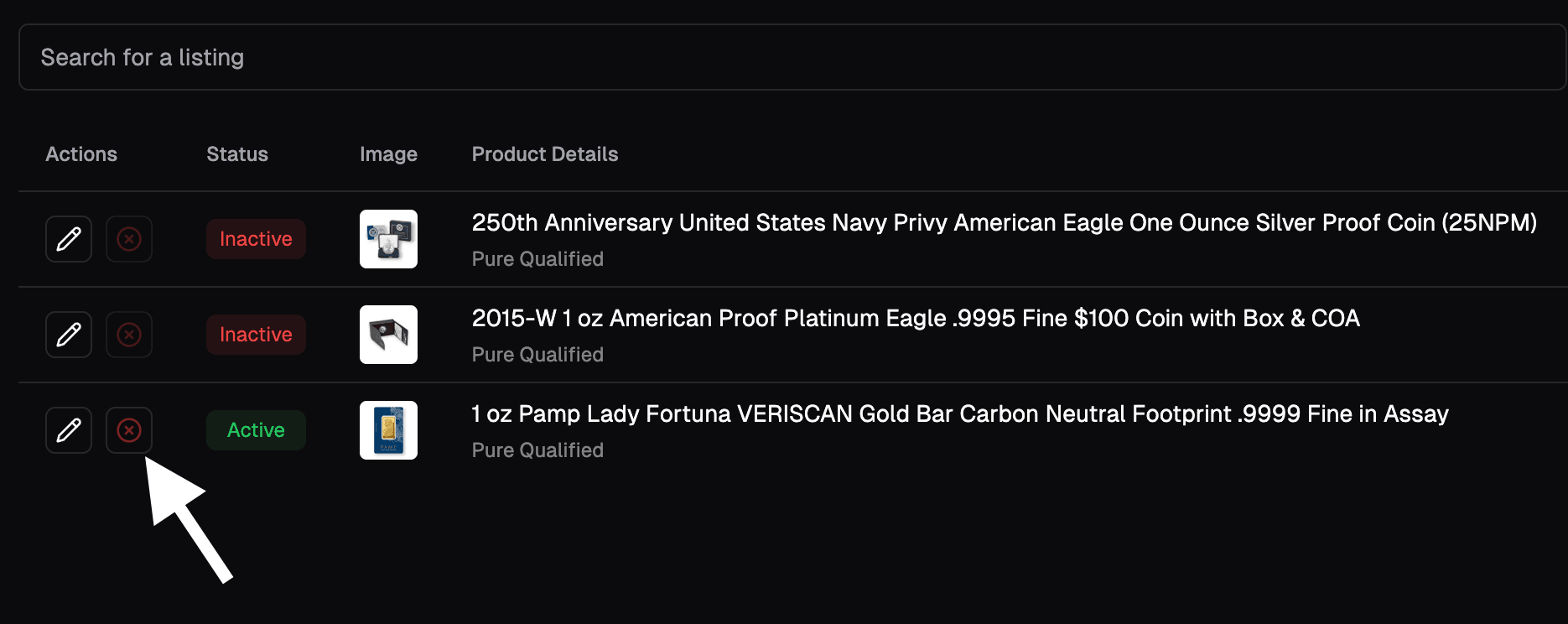
If you have an active listing you no longer want, go to the dashboard's "Listings" tab (or use this link) and click deactivate on the item. Note: if you place an ask and later sell by accepting the highest bid instead, your original ask stays active and won't be removed automatically. You'll need to deactivate it separately.
Getting Paid After You Sell
Once your item checks in and clears verification, payout is automatic; there's no separate request step. Funds typically arrive 24 to 72 business hours after check-in, by ACH or check (wire transfer is available for sellers at the Gold tier and above, $300,000+ in quarterly sales).
Every shipment is insured both ways for up to $125,000 through FedEx, covering your item from the moment it leaves your hands until it's confirmed at our facility.
Seller fees are tiered by quarterly sales volume and vary by product type (bullion, numismatic, platinum/silver/palladium). See Selling Fees and Shipping Costs on Pure for the full breakdown.
Support for Selling
As always, reach out to support if you run into a problem selling on Pure. We're happy to help facilitate the transaction and assist with your order at any time. Note that market loss applies if items aren't fulfilled within the timeframe outlined in the shipping terms and conditions.
FAQ
How long does it take to get paid after selling on Pure?
Payout is automatic once your item checks in and verifies, no manual request needed. Most sellers see funds in 24 to 72 business hours, by ACH or check.
Is my shipment insured when I sell on Pure?
Yes. Every shipment is insured both ways for up to $125,000 through FedEx.
What are Pure's seller fees?
Fees are tiered by your quarterly sales volume and vary by product type. See the full seller fee breakdown for current rates.
How do I cancel a listing on Pure?
Go to the Listings tab in your dashboard and click deactivate next to the item. If you've already sold by accepting a bid on an item you also had an ask on, deactivate that original ask separately since it won't clear on its own.